<!DOCTYPE html>
<html lang="ru">
<head>
    <meta charset="UTF-8">
    <meta name="viewport" content="width=device-width, initial-scale=1.0">
    <title>Виджет полезных ссылок</title>
    <link rel="stylesheet" href="https://cdnjs.cloudflare.com/ajax/libs/font-awesome/6.4.0/css/all.min.css">
    <style>
        * {
            margin: 0;
            padding: 0;
            box-sizing: border-box;
            font-family: 'Segoe UI', system-ui, sans-serif;
        }

        body {
            display: flex;
            justify-content: center;
            align-items: center;
            min-height: 100vh;
            background: linear-gradient(135deg, #6a11cb 0%, #2575fc 100%);
            padding: 20px;
        }

        .widget-container {
            width: 100%;
            max-width: 420px;
            animation: fadeIn 0.5s ease-out;
        }

        @keyframes fadeIn {
            from { opacity: 0; transform: translateY(20px); }
            to { opacity: 1; transform: translateY(0); }
        }

        .widget-header {
            background: rgba(255, 255, 255, 0.95);
            border-radius: 16px 16px 0 0;
            padding: 24px;
            box-shadow: 0 10px 30px rgba(0, 0, 0, 0.1);
            backdrop-filter: blur(10px);
            border-bottom: 1px solid rgba(255, 255, 255, 0.3);
        }

        .widget-title {
            display: flex;
            align-items: center;
            gap: 12px;
            color: #2d3436;
            font-size: 22px;
            font-weight: 700;
            margin-bottom: 8px;
        }

        .widget-title i {
            color: #6c5ce7;
            font-size: 24px;
        }

        .widget-subtitle {
            color: #636e72;
            font-size: 14px;
            font-weight: 500;
        }

        .links-container {
            background: rgba(255, 255, 255, 0.9);
            border-radius: 0 0 16px 16px;
            padding: 16px;
            box-shadow: 0 15px 35px rgba(0, 0, 0, 0.15);
            backdrop-filter: blur(10px);
        }

        .link-item {
            display: flex;
            align-items: center;
            padding: 18px 16px;
            margin-bottom: 12px;
            border-radius: 12px;
            background: white;
            text-decoration: none;
            color: #2d3436;
            transition: all 0.3s ease;
            box-shadow: 0 3px 10px rgba(0, 0, 0, 0.05);
            position: relative;
            overflow: hidden;
            border-left: 4px solid transparent;
        }

        .link-item:hover {
            transform: translateY(-3px);
            box-shadow: 0 8px 20px rgba(0, 0, 0, 0.1);
            border-left-color: #6c5ce7;
        }

        .link-item:hover .link-icon {
            transform: scale(1.1);
        }

        .link-icon {
            width: 46px;
            height: 46px;
            border-radius: 12px;
            display: flex;
            align-items: center;
            justify-content: center;
            margin-right: 16px;
            font-size: 20px;
            color: white;
            transition: all 0.3s ease;
        }

        .link-content {
            flex: 1;
        }

        .link-title {
            font-weight: 600;
            font-size: 16px;
            margin-bottom: 4px;
        }

        .link-description {
            font-size: 13px;
            color: #636e72;
            line-height: 1.4;
        }

        .link-arrow {
            color: #b2bec3;
            font-size: 14px;
            transition: all 0.3s ease;
        }

        .link-item:hover .link-arrow {
            color: #6c5ce7;
            transform: translateX(4px);
        }

        .widget-footer {
            text-align: center;
            margin-top: 20px;
            color: rgba(255, 255, 255, 0.8);
            font-size: 13px;
        }

        /* Адаптивность */
        @media (max-width: 480px) {
            .widget-container {
                max-width: 100%;
            }

            .link-item {
                padding: 16px 14px;
            }

            .link-icon {
                width: 40px;
                height: 40px;
                font-size: 18px;
            }
        }

        /* Эффект пульсации при загрузке */
        @keyframes pulse {
            0% { box-shadow: 0 0 0 0 rgba(108, 92, 231, 0.4); }
            70% { box-shadow: 0 0 0 8px rgba(108, 92, 231, 0); }
            100% { box-shadow: 0 0 0 0 rgba(108, 92, 231, 0); }
        }
    </style>
</head>
<body>
    <div class="widget-container">
        <div class="widget-header">
            <div class="widget-title">
                <i class="fas fa-rocket"></i>
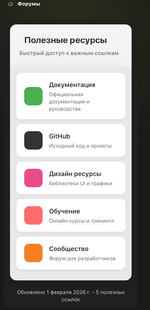
                Полезные ресурсы
            </div>
            <div class="widget-subtitle">Быстрый доступ к важным ссылкам</div>
        </div>

        <div class="links-container" id="linksContainer">
            <!-- Ссылки будут добавлены через JS -->
        </div>

        <div class="widget-footer">
            Обновлено сегодня • 5 полезных ссылок
        </div>
    </div>

    <script>
        // Данные ссылок
        const links = [
            {
                id: 1,
                title: "Документация",
                description: "Официальная документация и руководства",
                url: "https://developer.mozilla.org",
                icon: "fas fa-book",
                iconColor: "#4CAF50"
            },
            {
                id: 2,
                title: "GitHub",
                description: "Исходный код и проекты",
                url: "https://github.com",
                icon: "fab fa-github",
                iconColor: "#333"
            },
            {
                id: 3,
                title: "Дизайн ресурсы",
                description: "Библиотеки UI и графики",
                url: "https://dribbble.com",
                icon: "fas fa-palette",
                iconColor: "#EA4C89"
            },
            {
                id: 4,
                title: "Обучение",
                description: "Онлайн курсы и тренинги",
                url: "https://www.freecodecamp.org",
                icon: "fas fa-graduation-cap",
                iconColor: "#FF6B6B"
            },
            {
                id: 5,
                title: "Сообщество",
                description: "Форум для разработчиков",
                url: "https://stackoverflow.com",
                icon: "fas fa-users",
                iconColor: "#F48024"
            }
        ];

        // Контейнер для ссылок
        const linksContainer = document.getElementById('linksContainer');

        // Функция для создания элемента ссылки
        function createLinkElement(link) {
            const linkElement = document.createElement('a');
            linkElement.href = link.url;
            linkElement.className = 'link-item';
            linkElement.target = '_blank';
            linkElement.rel = 'noopener noreferrer';

            // Добавляем небольшую задержку для анимации появления
            linkElement.style.animationDelay = `${link.id * 0.1}s`;
            linkElement.style.opacity = '0';
            linkElement.style.animation = 'fadeIn 0.5s forwards';

            linkElement.innerHTML = `
                <div class="link-icon" style="background: ${link.iconColor};">
                    <i class="${link.icon}"></i>
                </div>
                <div class="link-content">
                    <div class="link-title">${link.title}</div>
                    <div class="link-description">${link.description}</div>
                </div>
                <div class="link-arrow">
                    <i class="fas fa-chevron-right"></i>
                </div>
            `;

            return linkElement;
        }

        // Функция для отображения всех ссылок
        function renderLinks() {
            linksContainer.innerHTML = '';

            links.forEach(link => {
                const linkElement = createLinkElement(link);
                linksContainer.appendChild(linkElement);
            });
        }

        // Функция для обновления времени в футере
        function updateFooterTime() {
            const now = new Date();
            const options = { day: 'numeric', month: 'long', year: 'numeric' };
            const dateString = now.toLocaleDateString('ru-RU', options);

            const footer = document.querySelector('.widget-footer');
            footer.innerHTML = `Обновлено ${dateString} • ${links.length} полезных ссылок`;
        }

        // Инициализация виджета
        function initWidget() {
            renderLinks();
            updateFooterTime();

            // Добавляем пульсацию для первого элемента
            const firstLink = document.querySelector('.link-item');
            if (firstLink) {
                firstLink.style.animation = 'fadeIn 0.5s forwards, pulse 2s 1s 2';
            }
        }

        // Запускаем виджет при загрузке страницы
        document.addEventListener('DOMContentLoaded', initWidget);

        // Дополнительно: можно добавить обновление времени каждые 10 минут
        setInterval(updateFooterTime, 600000);
    </script>
</body>
</html>