
alexkondr007
Проверенные
- Сообщения
- 26
- Реакции
- 2
- Баллы
- 30
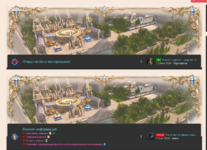
Привет, может кто подсказать код как сделать чтобы эти фоновые картинки у каждого узла были разные?

Смотрите видео ниже, чтобы узнать, как установить наш сайт в качестве веб-приложения на домашнем экране.

Примечание: В настоящее время эта функция требует доступа к сайту с помощью встроенного браузера Safari.

.block
{
    .block-box.wrapper
    {
        min-height: {{ property('xtr_category_block_header_height')}}px;
        max-width: 100%;
        border-top-left-radius: 4px;
        border-top-right-radius: 4px;
        <xf:if is="property('xtr_block_header_image_enable')">
        background-color: @xf-xtr_block_header_image_background;
        background-image: url(@xf-xtr_block_header_image);
        background-size: cover;
        background-position: 50% 50%;
        color...
Какой стиль используется?
.block
{
    .block-box.wrapper
    {
        min-height: {{ property('xtr_category_block_header_height')}}px;
        max-width: 100%;
        border-top-left-radius: 4px;
        border-top-right-radius: 4px;
        <xf:if is="property('xtr_block_header_image_enable')">
        background-color: @xf-xtr_block_header_image_background;
        background-image: url(@xf-xtr_block_header_image);
        background-size: cover;
        background-position: 50% 50%;
        color: @xf-xtr_categoryBlockHeaderColor;

        <xf:else />
        .xf-blockHeader();
        border-bottom: none;

        </xf:if>
        // Block header
        .block-header
        {
            a {
                color: inherit;
                text-decoration: none;
            }
            // Block header description
            .block-desc {
                color: inherit;
            }
        }
    }

    // Block body wrapper
    .block-content.wrapper
    {
        position: relative;
        z-index: 1;
        border-radius: @xf-borderRadiusLarge;
        margin: 0 auto;
        <xf:if is="{{ property('xmNodeLayout') }} == 'dual'">
        width: 100%;
        <xf:else />
        width: ~"calc(100% - 10px)";
        </xf:if>
        flex-flow: row wrap;
        justify-content: space-between;
    }

    .block-content.wrapper.is-active
    {
        display: flex;
        margin: -(@xf-paddingLarge * 7 - 5px) auto 0 auto;
    }


    // Block body node
    .block-content
    {
        display: flex;
        flex-flow: wrap;

        .node
        {
            background: @xf-xtr_node_rowBg;
            float: left;
            <xf:if is="{{ property('xmNodeLayout') }} == 'dual'">
            width: ~"calc(50% - 10px)";
            <xf:else />
            width: 100%;
            </xf:if>
            margin: 0 auto @xf-paddingMedium;
            padding: @xf-paddingMedium;
            border-radius: @xf-borderRadiusLarge;
            border: @xf-borderSize solid @xf-borderColorFaint;
            -webkit-box-shadow: 0 1px 20px 0 rgba(0,0,0,0.06);
            box-shadow: 0 1px 20px 0 rgba(0,0,0,0.06);

            <xf:if is="{{ property('xmNodeLayout') }} == 'dual'">
            @media (max-width: @_nodeList-statsCellBreakpoint)
            {
                width: ~"calc(100% - 10px)";
            }
            </xf:if>

            <xf:if is="property('xtr_nodes_hover_effect')">
            // Hover transform
            -webkit-transition: all .3s ease-in-out;
            -moz-transition: all .3s ease-in-out;
            -o-transition: all .3s ease-in-out;
            -ms-transition: all .3s ease-in-out;

            // Hover transform
            &:hover {
                z-index: 10;
                -webkit-box-shadow: 0 8px 17px 0 rgba(0, 0, 0, 0.2), 0 6px 20px 0 rgba(0, 0, 0, 0.02);
                box-shadow: 0 8px 17px 0 rgba(0, 0, 0, 0.2), 0 6px 20px 0 rgba(0, 0, 0, 0.02);
                -webkit-transform: scale(01);
                -moz-transform: scale(1.01);
                -o-transform: scale(1.01);
                transform: scale(1.01);
            }
            </xf:if>

            .node-body
            {
                @media (min-width: (@xf-responsiveMedium + 1))
                {
                    display: flex;
                    align-items: center;
                    justify-content: space-evenly;
                }

                .node-main
                {
                    flex: 1;
                }

                .node-extra .node-extra-title
                {
                    color: @xf-xtr_secondary_color;
                }

                .node-stats,
                .node-statsMeta
                {
                    <xf:if is="property('xtr_node_stats_hover')">
                    display: none;
                    </xf:if>
                }

                .node_rss,
                .node_more
                {
                    width: 38px;
                    display: flex;
                    align-items: center;
                    justify-content: center;
                }

                .node_rss
                {
                    a {
                        color: @xf-textColorMuted;
                        &:hover {
                            color: #FF9800;
                        }
                    }
                }

                .node_more
                {
                    button
                    {
                        background: none;
                        border: none;
                        color: @xf-textColorMuted;
                        transform: none;

                        &:active
                        {
                            background: none;
                            border: none;
                            color: @xf-linkColor;
                            transform: none;
                        }
                    }

                    .menuTrigger
                    {
                        &:after
                        {
                            content: "\f142";
                            position: relative;
                            transform: none;
                            background: none;
                        }

                        &:hover
                        {
                            &:after {
                                opacity: 1;
                                transform: none;
                            }
                        }
                    }

                    .button
                    {
                        &:not(.button--splitTrigger) {
                            &:hover {
                                background: none;
                                color: @xf-linkHoverColor;
                            }
                        }
                    }
                }

                @media (max-width: (@xf-responsiveMedium + 1))
                {
                    .node_rss,
                    .node_more
                    {
                        display: none;
                    }
                    .forum-node-icon
                    {
                        width: 46px;
                    }
                }
            }

            &:nth-child(2n+1)
            {
                clear: left;
            }

            <xf:if is="{{ property('xmNodeLayout') }} == 'dual'">
            &:last-child {
                &:nth-child(2n+1)
                {
                    width: ~"calc(100% - 10px)";
                }
            }

            .node-extra
            {
                display: block;
                width: 100%;
                background-color: @xf-contentAltBg;
                border-radius: 4px;
            }
            </xf:if>
        }
    }
}.block
{
.block-box.wrapper
{
min-height: {{ property('xtr_category_block_header_height')}}px;
max-width: 100%;
border-top-left-radius: 4px;
border-top-right-radius: 4px;
<xf:if is="property('xtr_block_header_image_enable')">
background-color: @xf-xtr_block_header_image_background;
background-image: url(@xf-xtr_block_header_image);
background-size: cover;
background-position: 50% 50%;
color: @xf-xtr_categoryBlockHeaderColor;
<xf:else />
.xf-blockHeader();
border-bottom: none;
</xf:if>
// Block header
.block-header
{
a {
color: inherit;
text-decoration: none;
}
// Block header description
.block-desc {
color: inherit;
}
}
}
// Block body wrapper
.block-content.wrapper
{
position: relative;
z-index: 1;
border-radius: @xf-borderRadiusLarge;
margin: 0 auto;
<xf:if is="{{ property('xmNodeLayout') }} == 'dual'">
width: 100%;
<xf:else />
width: ~"calc(100% - 10px)";
</xf:if>
flex-flow: row wrap;
justify-content: space-between;
}
.block-content.wrapper.is-active
{
display: flex;
margin: -(@xf-paddingLarge * 7 - 5px) auto 0 auto;
}
// Block body node
.block-content
{
display: flex;
flex-flow: wrap;
.node
{
background: @xf-xtr_node_rowBg;
float: left;
<xf:if is="{{ property('xmNodeLayout') }} == 'dual'">
width: ~"calc(50% - 10px)";
<xf:else />
width: 100%;
</xf:if>
margin: 0 auto @xf-paddingMedium;
padding: @xf-paddingMedium;
border-radius: @xf-borderRadiusLarge;
border: @xf-borderSize solid @xf-borderColorFaint;
-webkit-box-shadow: 0 1px 20px 0 rgba(0,0,0,0.06);
box-shadow: 0 1px 20px 0 rgba(0,0,0,0.06);
<xf:if is="{{ property('xmNodeLayout') }} == 'dual'">
@media (max-width: @_nodeList-statsCellBreakpoint)
{
width: ~"calc(100% - 10px)";
}
</xf:if>
<xf:if is="property('xtr_nodes_hover_effect')">
// Hover transform
-webkit-transition: all .3s ease-in-out;
-moz-transition: all .3s ease-in-out;
-o-transition: all .3s ease-in-out;
-ms-transition: all .3s ease-in-out;
// Hover transform
&:hover {
z-index: 10;
-webkit-box-shadow: 0 8px 17px 0 rgba(0, 0, 0, 0.2), 0 6px 20px 0 rgba(0, 0, 0, 0.02);
box-shadow: 0 8px 17px 0 rgba(0, 0, 0, 0.2), 0 6px 20px 0 rgba(0, 0, 0, 0.02);
-webkit-transform: scale(01);
-moz-transform: scale(1.01);
-o-transform: scale(1.01);
transform: scale(1.01);
}
</xf:if>
.node-body
{
@media (min-width: (@xf-responsiveMedium + 1))
{
display: flex;
align-items: center;
justify-content: space-evenly;
}
.node-main
{
flex: 1;
}
.node-extra .node-extra-title
{
color: @xf-xtr_secondary_color;
}
.node-stats,
.node-statsMeta
{
<xf:if is="property('xtr_node_stats_hover')">
display: none;
</xf:if>
}
.node_rss,
.node_more
{
width: 38px;
display: flex;
align-items: center;
justify-content: center;
}
.node_rss
{
a {
color: @xf-textColorMuted;
&:hover {
color: #FF9800;
}
}
}
.node_more
{
button
{
background: none;
border: none;
color: @xf-textColorMuted;
transform: none;
&:active
{
background: none;
border: none;
color: @xf-linkColor;
transform: none;
}
}
.menuTrigger
{
&:after
{
content: "\f142";
position: relative;
transform: none;
background: none;
}
&:hover
{
&:after {
opacity: 1;
transform: none;
}
}
}
.button
{
&:not(.button--splitTrigger) {
&:hover {
background: none;
color: @xf-linkHoverColor;
}
}
}
}
@media (max-width: (@xf-responsiveMedium + 1))
{
.node_rss,
.node_more
{
display: none;
}
.forum-node-icon
{
width: 46px;
}
}
}
&:nth-child(2n+1)
{
clear: left;
}
<xf:if is="{{ property('xmNodeLayout') }} == 'dual'">
&:last-child {
&:nth-child(2n+1)
{
width: ~"calc(100% - 10px)";
}
}
.node-extra
{
display: block;
width: 100%;
background-color: @xf-contentAltBg;
border-radius: 4px;
}
</xf:if>
}
}
}
.block--category1 .block-box.wrapper {
background-image: url('путь') !important;
background-size: cover !important;
background-position: 50% 50% !important;
}
.block--category2 .block-box.wrapper {
background-image: url('путь') !important;
background-size: cover !important;
background-position: 50% 50% !important;
}От души, спасибо)Сперва идёшь в настройки - Node/Forum list и там отключаешь галочку в пункте "Enable category blok header image". И далее делаешь модификацию шаблона
Шаблон: xtr_nodes.less
Ключ модификации: придумаешь
Тип поиска: Простая замена
Найти:
Заменить:Less:.block { .block-box.wrapper { min-height: {{ property('xtr_category_block_header_height')}}px; max-width: 100%; border-top-left-radius: 4px; border-top-right-radius: 4px; <xf:if is="property('xtr_block_header_image_enable')"> background-color: @xf-xtr_block_header_image_background; background-image: url(@xf-xtr_block_header_image); background-size: cover; background-position: 50% 50%; color: @xf-xtr_categoryBlockHeaderColor; <xf:else /> .xf-blockHeader(); border-bottom: none; </xf:if> // Block header .block-header { a { color: inherit; text-decoration: none; } // Block header description .block-desc { color: inherit; } } } // Block body wrapper .block-content.wrapper { position: relative; z-index: 1; border-radius: @xf-borderRadiusLarge; margin: 0 auto; <xf:if is="{{ property('xmNodeLayout') }} == 'dual'"> width: 100%; <xf:else /> width: ~"calc(100% - 10px)"; </xf:if> flex-flow: row wrap; justify-content: space-between; } .block-content.wrapper.is-active { display: flex; margin: -(@xf-paddingLarge * 7 - 5px) auto 0 auto; } // Block body node .block-content { display: flex; flex-flow: wrap; .node { background: @xf-xtr_node_rowBg; float: left; <xf:if is="{{ property('xmNodeLayout') }} == 'dual'"> width: ~"calc(50% - 10px)"; <xf:else /> width: 100%; </xf:if> margin: 0 auto @xf-paddingMedium; padding: @xf-paddingMedium; border-radius: @xf-borderRadiusLarge; border: @xf-borderSize solid @xf-borderColorFaint; -webkit-box-shadow: 0 1px 20px 0 rgba(0,0,0,0.06); box-shadow: 0 1px 20px 0 rgba(0,0,0,0.06); <xf:if is="{{ property('xmNodeLayout') }} == 'dual'"> @media (max-width: @_nodeList-statsCellBreakpoint) { width: ~"calc(100% - 10px)"; } </xf:if> <xf:if is="property('xtr_nodes_hover_effect')"> // Hover transform -webkit-transition: all .3s ease-in-out; -moz-transition: all .3s ease-in-out; -o-transition: all .3s ease-in-out; -ms-transition: all .3s ease-in-out; // Hover transform &:hover { z-index: 10; -webkit-box-shadow: 0 8px 17px 0 rgba(0, 0, 0, 0.2), 0 6px 20px 0 rgba(0, 0, 0, 0.02); box-shadow: 0 8px 17px 0 rgba(0, 0, 0, 0.2), 0 6px 20px 0 rgba(0, 0, 0, 0.02); -webkit-transform: scale(01); -moz-transform: scale(1.01); -o-transform: scale(1.01); transform: scale(1.01); } </xf:if> .node-body { @media (min-width: (@xf-responsiveMedium + 1)) { display: flex; align-items: center; justify-content: space-evenly; } .node-main { flex: 1; } .node-extra .node-extra-title { color: @xf-xtr_secondary_color; } .node-stats, .node-statsMeta { <xf:if is="property('xtr_node_stats_hover')"> display: none; </xf:if> } .node_rss, .node_more { width: 38px; display: flex; align-items: center; justify-content: center; } .node_rss { a { color: @xf-textColorMuted; &:hover { color: #FF9800; } } } .node_more { button { background: none; border: none; color: @xf-textColorMuted; transform: none; &:active { background: none; border: none; color: @xf-linkColor; transform: none; } } .menuTrigger { &:after { content: "\f142"; position: relative; transform: none; background: none; } &:hover { &:after { opacity: 1; transform: none; } } } .button { &:not(.button--splitTrigger) { &:hover { background: none; color: @xf-linkHoverColor; } } } } @media (max-width: (@xf-responsiveMedium + 1)) { .node_rss, .node_more { display: none; } .forum-node-icon { width: 46px; } } } &:nth-child(2n+1) { clear: left; } <xf:if is="{{ property('xmNodeLayout') }} == 'dual'"> &:last-child { &:nth-child(2n+1) { width: ~"calc(100% - 10px)"; } } .node-extra { display: block; width: 100%; background-color: @xf-contentAltBg; border-radius: 4px; } </xf:if> } } }
Где в блоке "Заменить" в самом низу кода в свойствах .block--category1 .block-box.wrapper:Less:.block { .block-box.wrapper { min-height: {{ property('xtr_category_block_header_height')}}px; max-width: 100%; border-top-left-radius: 4px; border-top-right-radius: 4px; <xf:if is="property('xtr_block_header_image_enable')"> background-color: @xf-xtr_block_header_image_background; background-image: url(@xf-xtr_block_header_image); background-size: cover; background-position: 50% 50%; color: @xf-xtr_categoryBlockHeaderColor; <xf:else /> .xf-blockHeader(); border-bottom: none; </xf:if> // Block header .block-header { a { color: inherit; text-decoration: none; } // Block header description .block-desc { color: inherit; } } } // Block body wrapper .block-content.wrapper { position: relative; z-index: 1; border-radius: @xf-borderRadiusLarge; margin: 0 auto; <xf:if is="{{ property('xmNodeLayout') }} == 'dual'"> width: 100%; <xf:else /> width: ~"calc(100% - 10px)"; </xf:if> flex-flow: row wrap; justify-content: space-between; } .block-content.wrapper.is-active { display: flex; margin: -(@xf-paddingLarge * 7 - 5px) auto 0 auto; } // Block body node .block-content { display: flex; flex-flow: wrap; .node { background: @xf-xtr_node_rowBg; float: left; <xf:if is="{{ property('xmNodeLayout') }} == 'dual'"> width: ~"calc(50% - 10px)"; <xf:else /> width: 100%; </xf:if> margin: 0 auto @xf-paddingMedium; padding: @xf-paddingMedium; border-radius: @xf-borderRadiusLarge; border: @xf-borderSize solid @xf-borderColorFaint; -webkit-box-shadow: 0 1px 20px 0 rgba(0,0,0,0.06); box-shadow: 0 1px 20px 0 rgba(0,0,0,0.06); <xf:if is="{{ property('xmNodeLayout') }} == 'dual'"> @media (max-width: @_nodeList-statsCellBreakpoint) { width: ~"calc(100% - 10px)"; } </xf:if> <xf:if is="property('xtr_nodes_hover_effect')"> // Hover transform -webkit-transition: all .3s ease-in-out; -moz-transition: all .3s ease-in-out; -o-transition: all .3s ease-in-out; -ms-transition: all .3s ease-in-out; // Hover transform &:hover { z-index: 10; -webkit-box-shadow: 0 8px 17px 0 rgba(0, 0, 0, 0.2), 0 6px 20px 0 rgba(0, 0, 0, 0.02); box-shadow: 0 8px 17px 0 rgba(0, 0, 0, 0.2), 0 6px 20px 0 rgba(0, 0, 0, 0.02); -webkit-transform: scale(01); -moz-transform: scale(1.01); -o-transform: scale(1.01); transform: scale(1.01); } </xf:if> .node-body { @media (min-width: (@xf-responsiveMedium + 1)) { display: flex; align-items: center; justify-content: space-evenly; } .node-main { flex: 1; } .node-extra .node-extra-title { color: @xf-xtr_secondary_color; } .node-stats, .node-statsMeta { <xf:if is="property('xtr_node_stats_hover')"> display: none; </xf:if> } .node_rss, .node_more { width: 38px; display: flex; align-items: center; justify-content: center; } .node_rss { a { color: @xf-textColorMuted; &:hover { color: #FF9800; } } } .node_more { button { background: none; border: none; color: @xf-textColorMuted; transform: none; &:active { background: none; border: none; color: @xf-linkColor; transform: none; } } .menuTrigger { &:after { content: "\f142"; position: relative; transform: none; background: none; } &:hover { &:after { opacity: 1; transform: none; } } } .button { &:not(.button--splitTrigger) { &:hover { background: none; color: @xf-linkHoverColor; } } } } @media (max-width: (@xf-responsiveMedium + 1)) { .node_rss, .node_more { display: none; } .forum-node-icon { width: 46px; } } } &:nth-child(2n+1) { clear: left; } <xf:if is="{{ property('xmNodeLayout') }} == 'dual'"> &:last-child { &:nth-child(2n+1) { width: ~"calc(100% - 10px)"; } } .node-extra { display: block; width: 100%; background-color: @xf-contentAltBg; border-radius: 4px; } </xf:if> } } } .block--category1 .block-box.wrapper { background-image: url('путь') !important; background-size: cover !important; background-position: 50% 50% !important; } .block--category2 .block-box.wrapper { background-image: url('путь') !important; background-size: cover !important; background-position: 50% 50% !important; }
число - твой id категории;
в url нужно будет указать твой путь к изображению;
и если нужно будет изменить положение фотки, то меняй значения в свойстве background-position.
А также в зависимости от твоего количества категорий добавляй их и устанавливай все значения по образцу



Мы используем основные cookies для обеспечения работы этого сайта, а также дополнительные cookies для обеспечения максимального удобства пользователя.
Посмотрите дополнительную информацию и настройте свои предпочтения