
Приложение
Как установить приложение на iOS
Смотрите видео ниже, чтобы узнать, как установить наш сайт в качестве веб-приложения на домашнем экране.
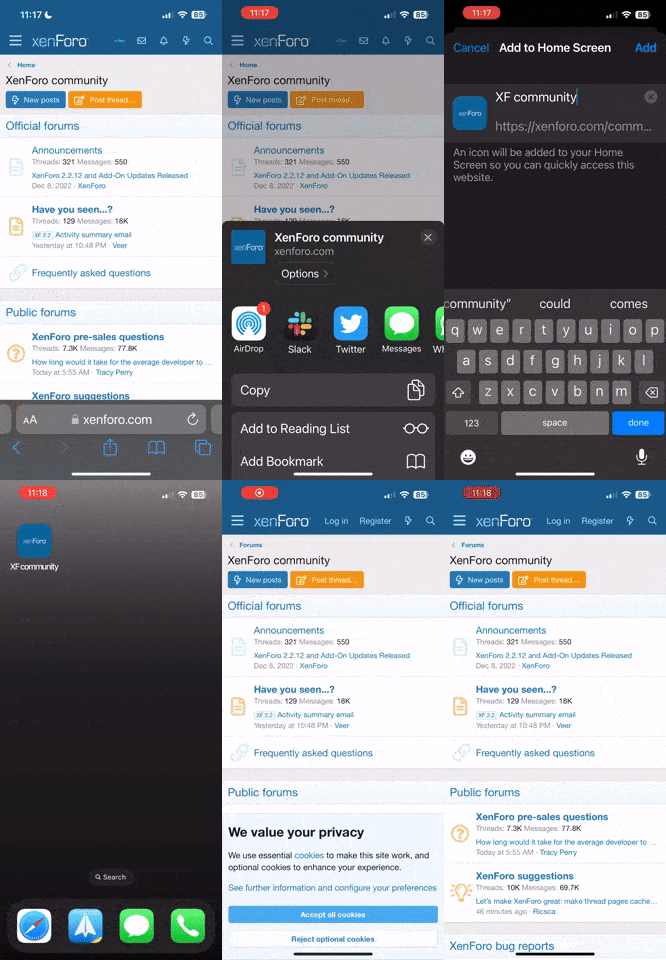
Примечание: В настоящее время эта функция требует доступа к сайту с помощью встроенного браузера Safari.
-
Новые темы в этом разделе публикуются автоматически при добавлении файла в менеджер ресурсов.
Ручное создание новых тем невозможно.
Вы используете устаревший браузер. Этот и другие сайты могут отображаться в нём некорректно.
Вам необходимо обновить браузер или попробовать использовать другой.
Вам необходимо обновить браузер или попробовать использовать другой.

BbCodes & Buttons Manager 3.3.5
Нет прав для скачивания
- Автор темы Hope
- Дата начала
А где их конкретно давать?Все изображения конечно же загружаются на наш сервер.
Вы права группа вообще дали на использование BB-кодов?

Hope
Premium
- Сообщения
- 48,332
- Решения
- 22
- Реакции
- 72,240
- Баллы
- 40,905
Пользователь Hope обновил ресурс BbCodes & Buttons Manager новой записью:
2.8.0
Узнать больше об этом обновлении...
2.8.0
- Добавлены новые права для официальных BB-кодов XenForo
- Изменён метод защиты содержимого
- Новая опция для разрешения или запрета использования определённых BB-кодов в подписи
- Кнопка зачёркивания текста теперь располагается прямо на панели инструментов
- Переписана функция предварительного парсера
Узнать больше об этом обновлении...


Hope
Premium
- Сообщения
- 48,332
- Решения
- 22
- Реакции
- 72,240
- Баллы
- 40,905
Как-то хреново он переведённый:
И ещё куча фраз не переведена. :)
Код:
<event event_id="bbm_callback_precache"><![CDATA[<p>If you need to make a database request for a Bb Code, the problem is it will be executes several times. This preCache system executes the formatter twice before parsing your text. The first time you can add some info in this preCache, then this listener will be executed. You can make your database request here and modified the preCache again so that when the formatter will be executed the second time, you can use the new data.</p>
<p>During the first execution, the $rendererStates will have the key 'bbmPreCacheInit'. During the second execution, it will have the key 'bbmPreCacheComplete'</p>
<p>To be effective, this event needs the admin to enable the Bbm precache in the Bbm Bb Codes options</p>
<blockquote style="overflow-x:auto;height:35px">
<code><em>array</em> &$preCache, <em>array</em> &$rendererStates, $formatterName</code>
</blockquote>
<p>Arguments:</p>
<ol>
<li><code><em>array</em> &$preCache</code> - the preCache data}.</li>
<li><code><em>array</em> $rendererStates</code> - rendering options for the XenForo renderer engine.
<li><code>$formatterName</code> - name of the formatter (base/wysiwyg).</li>
</ol>]]></event>
<event event_id="bbm_callback_template_cache"><![CDATA[<p>This listener allows to cache extra templates that must be rendered with your Bb Codes. You don't need to cache the template you have specified inside the Bb Code options. It is already automatically cached.</p>
<blockquote>
<code><em>array</em> &templates</code>
</blockquote>
<p>Arguments:</p>
<ol>
<li><code>&$templates/code> - the templates to cache in the view.</li>
</ol>
<p>Example:</p>
<pre> public static function myDemo(&$templates)
{
$templates[] = 'myNewTemplateToLoad';
}
</pre>]]></event>
<event event_id="bbm_callback_template_pre"><
sonic
Проверенные
- Сообщения
- 1,435
- Реакции
- 1,828
- Баллы
- 8,445
Askhab_Rv, плюс поиском не умеем пользоватся
http://xenforo.info/resources/Русский-язык-для-bbcodes-buttons-manager.1480/
который подходит для ВВМ версии 2.7.0, а может и 2.8.0 так как 2.8.0 я пока не ставил и не смотрел появились ли не переведенные фразы.
http://xenforo.info/resources/Русский-язык-для-bbcodes-buttons-manager.1480/
который подходит для ВВМ версии 2.7.0, а может и 2.8.0 так как 2.8.0 я пока не ставил и не смотрел появились ли не переведенные фразы.

kolobrod
Проверенные
- Сообщения
- 46
- Реакции
- 16
- Баллы
- 5,505
Все права стоят разрешено. В том то и дело :)Так в правах и ковыряйте. Сами же сказали, что права попортили.
kolobrod
Проверенные
- Сообщения
- 46
- Реакции
- 16
- Баллы
- 5,505
Не, там нет такого) Модератор к примеру видит нормально ссылки, т.е. обработка для него идет.Так в настройках этого плагина смотрите, а не в основных правах для групп. :-)
У админа - нет :)

Homer Jay Simpson
Проверенные
- Сообщения
- 330
- Реакции
- 153
- Баллы
- 28,545
Все права у админа на нет установите в данном модулеНе, там нет такого) Модератор к примеру видит нормально ссылки, т.е. обработка для него идет.
У админа - нет :-)
Hope
Premium
- Сообщения
- 48,332
- Решения
- 22
- Реакции
- 72,240
- Баллы
- 40,905
Пользователь Hope обновил ресурс BbCodes & Buttons Manager новой записью:
2.8.1
Узнать больше об этом обновлении...
2.8.1
- Твики для тегов
- Изменение в JavaScript
- Прочие исправления
Узнать больше об этом обновлении...
Hope
Premium
- Сообщения
- 48,332
- Решения
- 22
- Реакции
- 72,240
- Баллы
- 40,905
Пользователь Hope обновил ресурс BbCodes & Buttons Manager новой записью:
2.8.2
Узнать больше об этом обновлении...
2.8.2
- Исправление ошибок
- Добавление новых функций
Узнать больше об этом обновлении...



